Sales order workflow and statuses
In the “Sales” section, a sales order goes through statuses. Statuses define:
- whether an order can be edited;
- whether an order can be Canceled;
- whether related documents can be created (shipments, invoices, manufacturing/purchase orders).
Whether an order is editable in a given status is configured with the “Read-only” checkbox in “Sales” → “Configuration” → “Settings”. In addition, a single order can be locked for editing with the padlock toggle on its card.
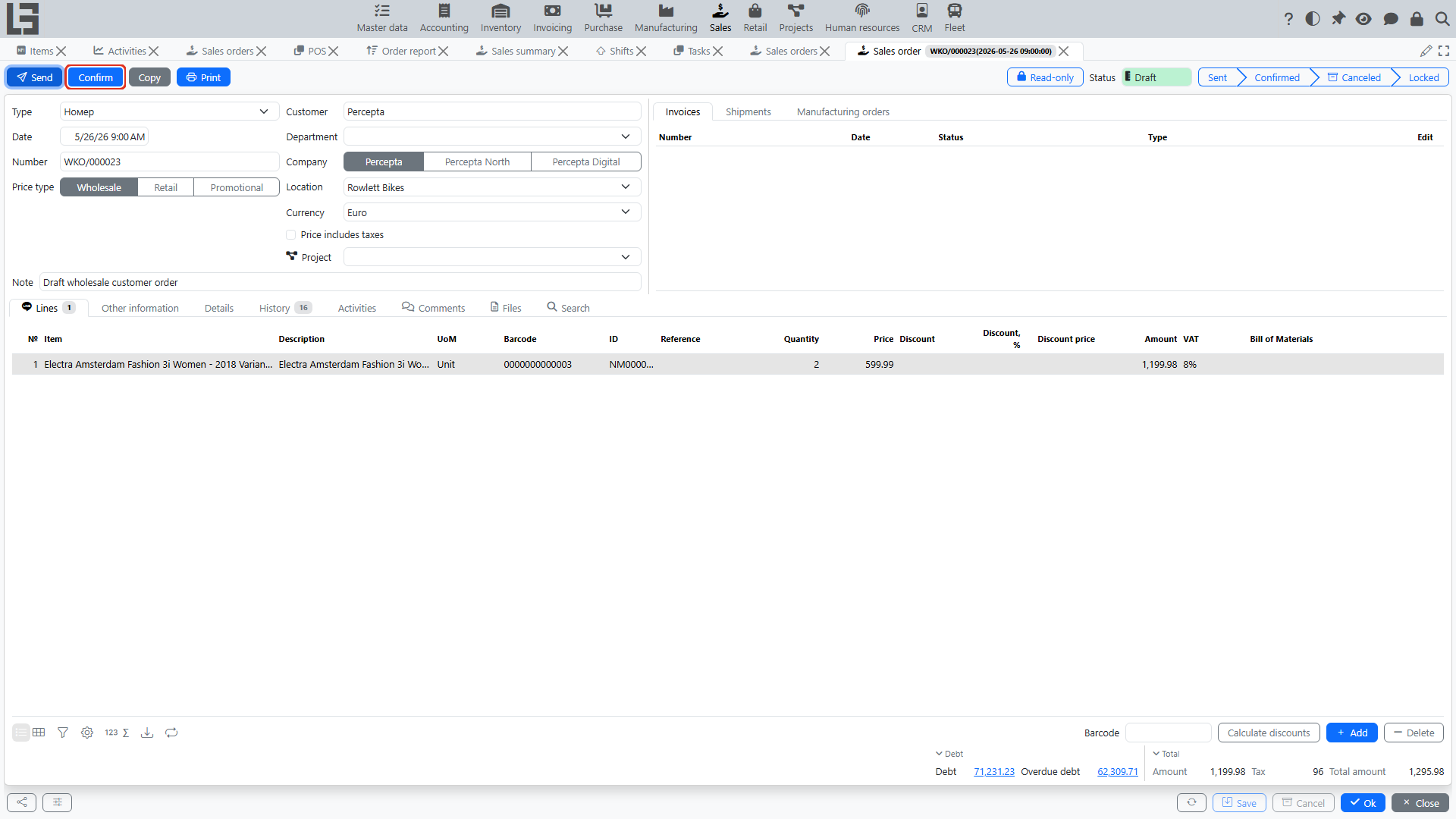
Typical workflow
- Draft
- the order can be edited; lines can be added and removed;
- default status for a new order.
- Sent
- the order has been sent to the customer via the “Send” action;
- the email is sent only if a “Default template” is set in the order type; otherwise the action only changes the status;
- subject, body, default template (the printable form attached), and copy-to address are configured in the order type; the copy-to address receives a hidden copy (BCC);
- reachable from “Draft”; from “Sent” you can go directly to “Confirmed”.
- Confirmed
- the order is considered agreed; reachable from “Draft” or “Sent”;
- shipments and invoices can be created for it; while there is uninvoiced quantity, the order shows a “Create Invoice” button, and the lines show the “Invoiced” and “Paid” indicators;
- if the order type has a “Shipment type”, a reserve shipment is created automatically on confirmation;
- if the order type has a “Manufacturing order type” and the “Automatically create a production order” flag, manufacturing orders are created automatically;
- purchase orders are not created automatically — confirmed sales order lines are added manually on the purchase order form.
- Locked
- the order is closed for further work (e.g. after full fulfillment); locked orders are hidden by the default “Opened” filter in the order list;
- reachable only from “Confirmed”;
- the order type can enable additional restrictions: “Forbid to lock orders with active shipments”, “Forbid to lock orders that are not fully shipped”, and “Forbid to lock orders that are not fully paid”;
- if these restrictions are off, locking the order deletes its active reserve shipment.
- Canceled
- the order is closed and will not be fulfilled;
- reachable from any status except “Draft” and “Canceled”.
Exact status names and restrictions depend on your configuration.
Restrictions and checks
Common rules include:
- you cannot delete an order line if a manufacturing order has already been created from it;
- you cannot cancel an order if there are “started” processes for it (for example, active manufacturing orders);
- when locking an order, the system checks the order type’s restrictions (active shipments, incomplete shipping, and/or incomplete payment) and shows a message if locking is forbidden.
Recommendations
- confirm the order only after verifying prices, location, and delivery terms;
- if you need to close an order without fulfillment, use cancellation instead of deletion.