Purchase settings
Where to find
Settings are usually located at “Purchase” → “Configuration” → “Settings”.
Purchase order type
Most purchase behavior is configured on the purchase order type. For each type you can set:
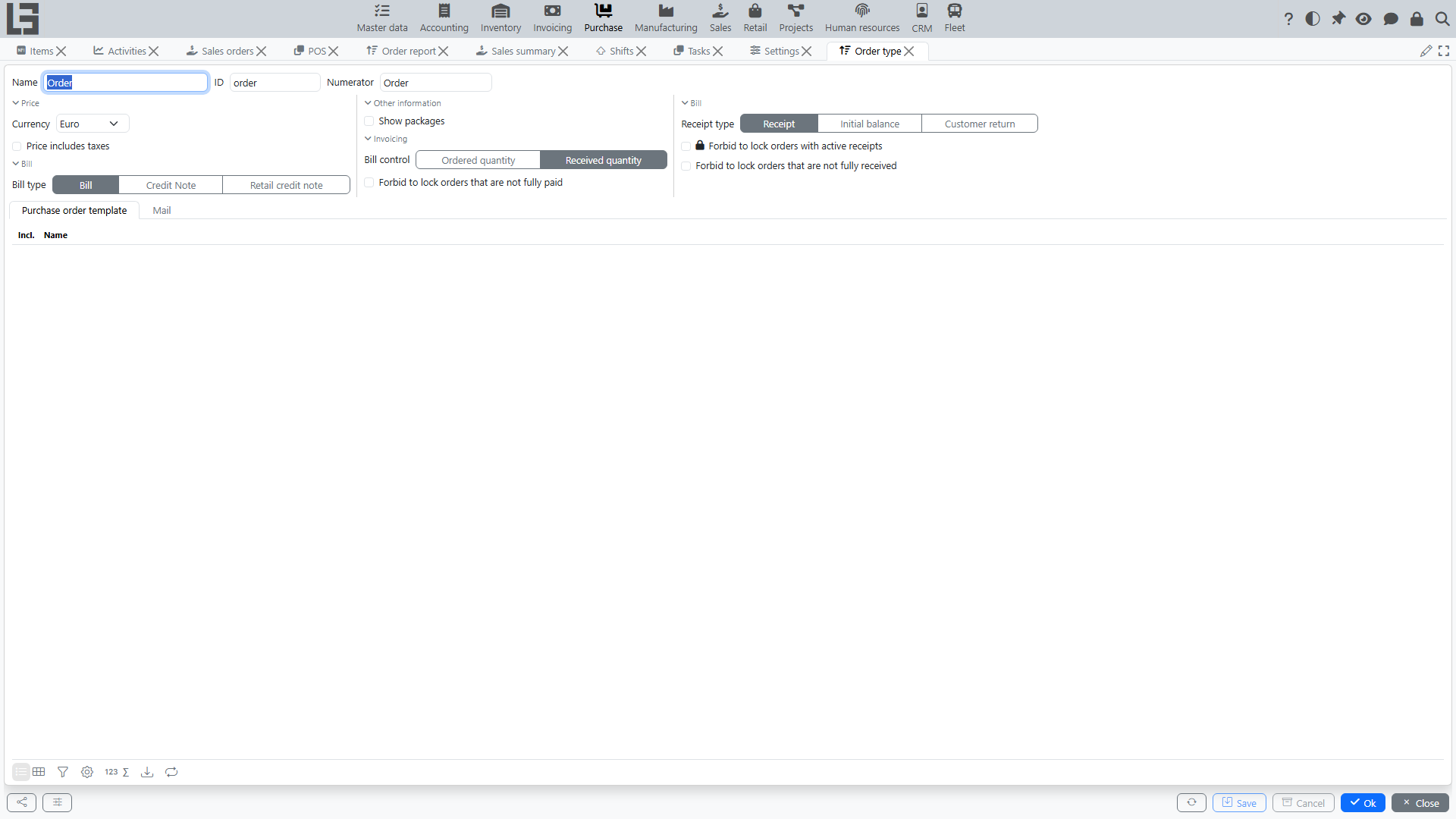
Basic fields
- numerator — number format and counter for orders;
- default currency and the “price includes taxes” flag;
- “Show packages” flag — adds packaging-unit columns to order lines (see Number of packages).
The location and payment terms are not set on the order type: the location is specified on each order, and the payment terms default from the vendor card.
Links to other documents
- Receipt type — which document is created as a reserve receipt when the order is confirmed (see Receipts for purchase orders);
- Bill type — which document is created by the “Create bill” action (see Bills for purchase orders);
- Bill control — “Ordered quantity” or “Received quantity”; defines which quantity is transferred to the bill.
Purchase orders do not create manufacturing orders; it works the other way around — manufacturing demand can feed purchase auto-ordering (see Automatic order filling).
Sending a purchase order to a vendor
Fields used by the “Send” action:
- “Default template” — the printable form attached to the email;
- Topic — email subject;
- email body;
- “Copy to” — an address that receives the email as a hidden copy (Bcc).
The “Send” action is always available on the order card in the “Draft” status. If a template is configured, an email with the attached printable form is sent to the vendor; otherwise the action simply moves the order to “Sent”.
Lock restrictions
Three independent flags affect the “Lock” action (it moves the order to the “Locked” status):
- “Forbid to lock orders with active receipts” — prevents locking while a reserve receipt is in “Ready”;
- “Forbid to lock orders that are not fully received” — prevents locking while there is a remaining quantity to receive;
- “Forbid to lock orders that are not fully paid” — prevents locking while not all quantity is paid.
Without these flags, locking proceeds without checks (and the reserve receipt is simply deleted).
Pricelist import type
A separate Pricelist import type (with a script) is configured globally; it powers the “Import” action on a vendor’s pricelist card. See Vendor pricelists → Importing prices.
In the “Pricelist import types” block of the Settings form, the “Default” column marks the fallback import type used for vendors that have no import type of their own (see Default import type). Each import type card also has a “Vendors” tab where the vendors using this type are selected.
Other master data that affects purchase behavior
- vendors — header fields, pricelist import type, the “Order period” field used by automatic ordering;
- items and purchase packages — used by auto-order to round quantities;
- taxes and currencies — common master data.