Debt and payment calendar
Debt
In "Invoicing", documents and payments are all treated as debt entries with a sign: bills and incoming payments create debt in one direction, invoices and outgoing payments in the other. There are two distinct figures:
- Partner / contract debt — the signed sum of all active documents for a partner or contract. This total exists as soon as a document exists; it does not depend on matching. Amounts are converted to the default currency (unless conversion is switched off in settings).
- Remaining (Left) — for a single document, its amount minus the matched payments. This is what decreases when you match a payment.
Points worth understanding:
- a Canceled document is excluded from every debt calculation;
- Overdue debt is the part of the debt whose Pay before date is already in the past;
- matching only affects the document-level Left/Paid figures; the partner total already reflects the document from the moment it is entered.
The dedicated views Partner debts and Contract debts list each debt entry (type, number, date, Pay before, company, amount, Left, running Debt) with an Overdue filter, and show Debt plus Overdue debt totals per partner/contract.
How debt is closed
- Create a payment.
- Match the payment with the document (or match with several documents). Matching can also happen automatically when the payment's Reference contains the document number.
- Once matched, the document's remaining amount (Left) decreases; when it reaches zero the document is marked Paid.
If the payment is matched with several documents, the remaining amount decreases for each document by the corresponding amount.
Payment calendar
The payment calendar (Invoicing → Reporting → Payment calendar) shows the outstanding balance spread across a date range, so you can see when money is due in and out.
Layout:
- pick the Company and a date interval at the top; < / > jump the interval one month back/forward. The interval starts as today … today + 14 days.
- Cash balance shows the current balance of the company's accounts.
- Debt before is the outstanding balance whose Pay before date falls before the interval starts.
- there is then one column per date in the interval; each cell holds the net debt change due that day. The column footer shows the forecast cash — the running balance (cash balance plus cumulative debt) through that date.
- cells are shaded green (positive) or red (negative).
The calendar has two breakdown tabs — Type and Partner — plus a cash-balance chart.
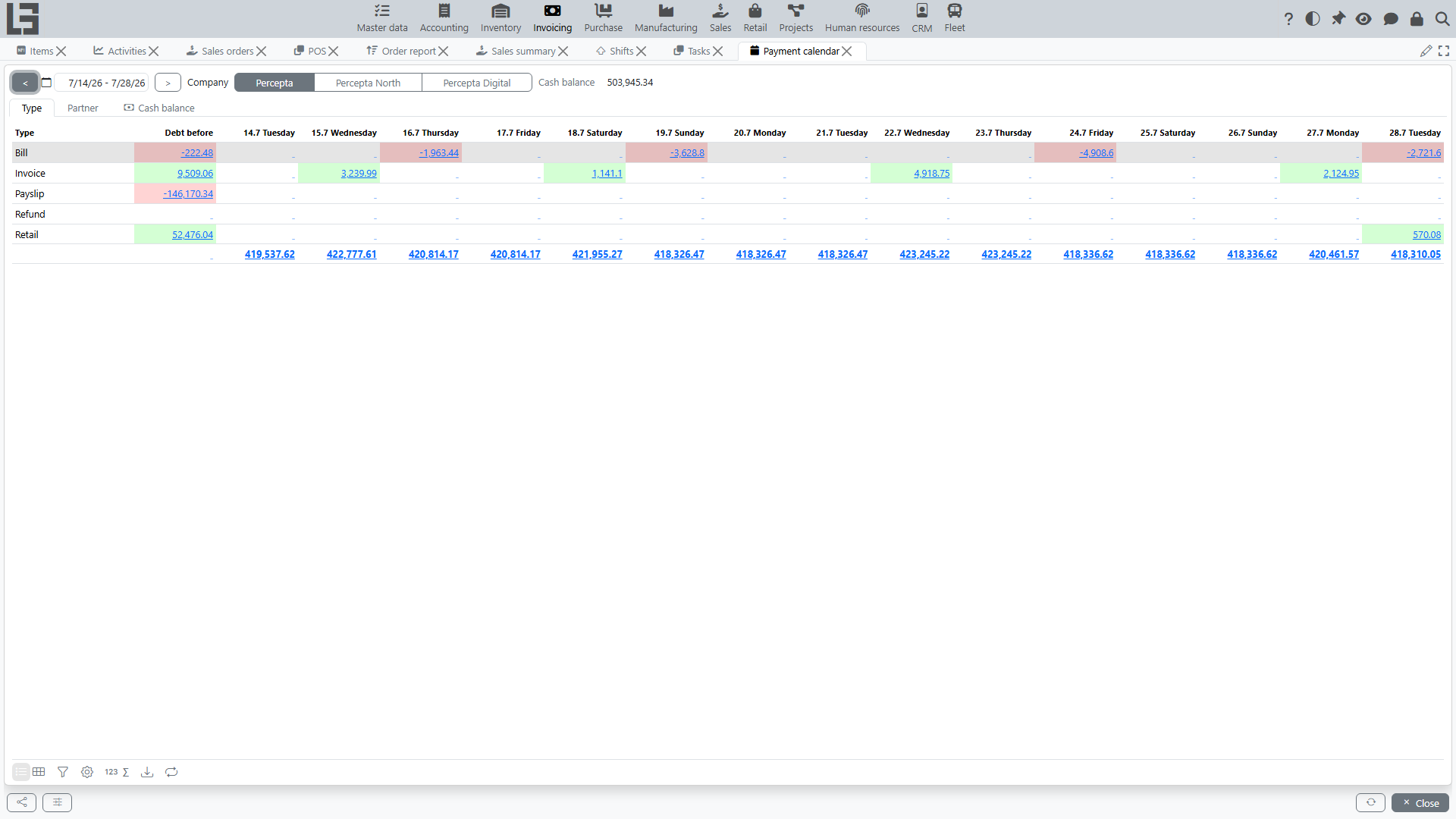 The due date comes from each document's stored Pay before value (computed once from the payment terms at entry), not re-derived on the fly.
Clicking a Debt before or date cell drills down into the underlying documents (the Debts list filtered by company, type, partner and due date).
What to check if the calendar is “empty” or dates are incorrect
Check:
- whether payment terms / Pay before are filled in documents;
- whether the chosen date interval actually covers the due dates;
- whether documents are excluded by status (for example, Canceled).
See parameters: Settings and directories.