Reports and ledgers
The reports live in “Inventory” → “Reporting”. Four forms are available: Inventory report, Inventory valuation, Product moves and Cost report.
Inventory report
Stock on hand with filters and breakdowns.
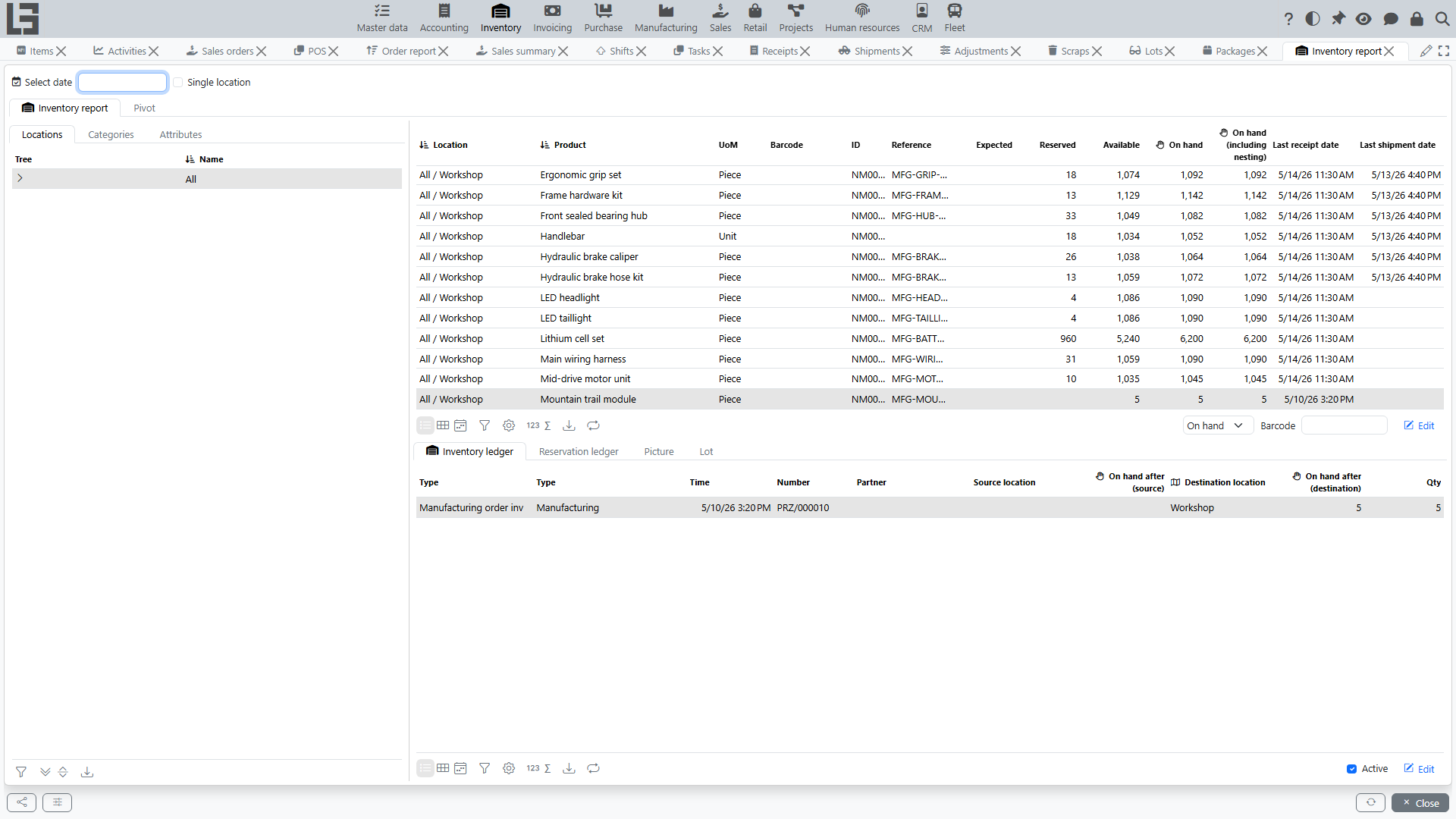
- Filters: an optional date (Select date — the “as of” view), a Single location toggle, and Locations (tree), Categories and Attributes filter tabs.
- Columns per location/product: Expected, Reserved, Available (from the reservation ledger), On hand, On hand (including nesting) — i.e., together with child locations, on hand as of the selected date, and Last receipt date / Last shipment date.
- Next to the main table there is a Pivot tab.
- The bottom part shows the details for the selected product:
- Inventory ledger tab — every movement (document class, type, time, number, partner, source/destination location, quantity) with the resulting on-hand after the operation;
- Reservation ledger tab — reservations and expected quantities per document;
- Lot tab (when lots are enabled) — on-hand broken down by lot;
- Picture tab — the product image.
Inventory valuation
Quantity, unit cost and total cost per item/location — see item costing for details. Includes the Recalculate cost action, an optional “as of date” view, the inbound/outbound cost operation details and a pivot view.
Product moves
Item movements between locations over a period: each row is a movement (document class, type, time, number, product, quantity, source and destination location with the resulting on-hand on both sides, partner). Useful for tracing where a balance came from.
Cost report
Entries of the cost ledger (see also item costing) in a pivot layout: quantity and amount signed by direction (inbound positive, outbound negative), with product categories and attributes available as dimensions and a date-interval filter.
Ledgers
Under the hood, all reports are built on three ledgers:
- inventory ledger — physical stock movements; every completed receipt, shipment, transfer, scrap and adjustment writes entries here;
- reservation ledger — reservations (shipments being prepared) and expected quantities (receipts in Ready with the Increase available stock flag); available = on hand − reserved + expected;
- cost ledger — inbound/outbound cost entries (see item costing).
Practical purpose of ledgers:
- explain where a balance comes from;
- show movement history;
- help find the cause of variances.
The ledgers are not separate menu items — they are shown as detail tabs of the reports (and of the item/lot cards).
Integration
Current balances can also be queried by external systems through the HTTP API (Inventory.getInventory), which returns on-hand quantities as JSON, optionally filtered by category and location.