Adjustment
Adjustment (inventory counting) is used to compare the system stock with the actual quantity in a location.
Open “Inventory” → “Operations” → “Adjustments”.
The adjustment moves through the following statuses: Draft → In progress → Done, with Canceled as an alternative terminal state. The variance per line is recalculated automatically while the document is in In progress (as counted quantity minus theoretical quantity), and the corresponding inventory ledger postings are written when the document is moved to Done.
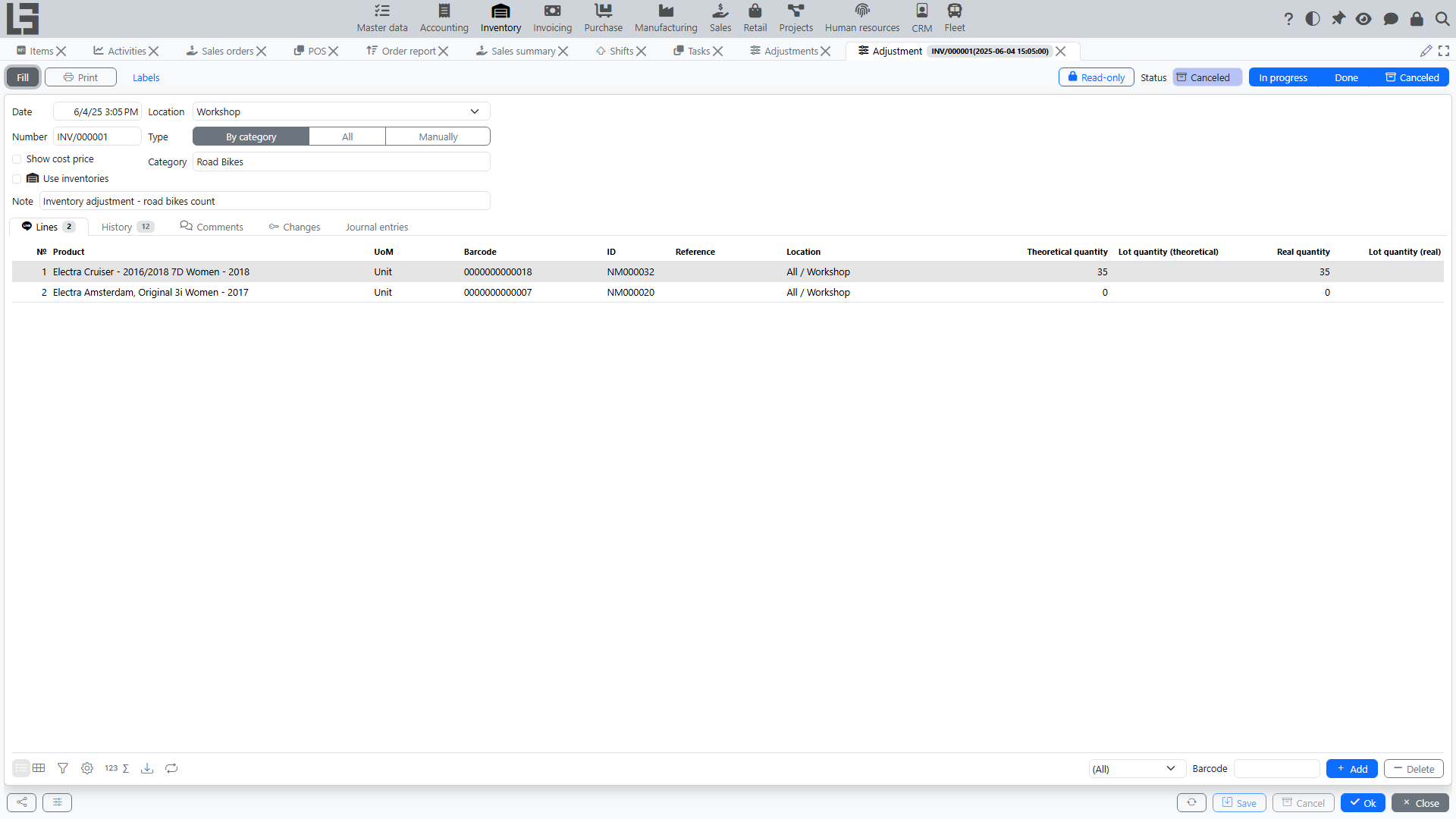
Adjustment types
The Type field controls how lines are filled:
- All — the Fill action adds all products that have stock at the location;
- By category — an extra Category field appears in the header, and Fill adds only the products of that category;
- Manually — lines are entered manually; while the document is In progress, a Search tab is available with a location tree and quick entry of counted quantities (including barcode scanning).
Quantities on a line
Each line carries two quantities:
- Theoretical quantity — the system stock at the moment the line was added (filled automatically);
- Real quantity — the counted quantity, editable while the document is In progress.
While the document is still in Draft, the real quantity is pre-filled with the theoretical one, so you only need to correct the lines where the physical count differs. The Difference column shows real minus theoretical; surplus lines are highlighted green and missing lines pink.
Quick line filters help the review: Mismatch (F10), Surplus (F9) and Missing (F8).
Status transition actions
- Mark as Todo — moves the document from Draft to In progress;
- Mark as Done — moves it from In progress to Done and posts the variances;
- Cancel — moves the document to Canceled.
Typical flow
Below is the recommended sequence of steps. It works both for a full location adjustment (counting) and for counting a zone/bin.
- Preparation
- Define the scope: location/zone/bin, item groups, whether you need lot/package accounting.
- Fix the “snapshot” moment:
- Create the document
- Move to status
In progress- Move the adjustment to
In progress(the Mark as Todo button). - After that, use the selected counting method: via counting lists (see below), the Search tab or manual entry.
- Move the adjustment to
- Enter actual quantities
- Fill in real quantities for items.
- If lot/serial accounting is enabled, enter quantities by lot on the Lots tab (the same surplus/missing highlighting works per lot).
- If bin-level storage is used, make sure you enter quantities for the required zone/bin (each line has its own sub-location).
- Review and reconcile
- The system continuously shows the variance for each line — counted quantity minus theoretical quantity — and provides quick filters for Mismatch, Surplus and Missing lines.
- Check lines with zero/unexpected values.
- If variances are large:
- re-check units of measure;
- verify that the selected location matches the physical one.
- If required, coordinate variances with the responsible person.
- Complete (move to Done)
- Move the adjustment to Done.
- At that moment the system posts the variances to the inventory ledger so that stock balances match the counted quantities (within the accounting rules of your configuration). The Changes tab of a completed document shows exactly what was posted.
Counting lists (Use inventories)
For large counts, enable the Use inventories flag on the adjustment — a separate “counting lists” mechanism becomes available on the Inventories tab:
- create one or more lists (each with its own number) and hand them out to the counting teams;
- each list records counted quantities per product and sub-location; barcode scanning is supported;
- the results from all lists are summed into the real quantities of the adjustment lines automatically;
- lists become read-only when the adjustment leaves the In progress status.
This decouples physical counting (several teams, several lists) from the variance calculation (one adjustment document).
Surplus valuation (Show cost price)
If the Show cost price flag is enabled on the adjustment, lines show the current unit cost and allow entering a unit cost manually. The entered cost is used to value surpluses (inbound cost ledger entries); missing quantities are written off automatically by the item's costing method — see item costing.
Bulk creation
The adjustments list has a Create tab that shows all active locations with the date, type and status of their last adjustment. From there you can create an adjustment for a location in one click (and see right away which products with stock it will cover). This is convenient for organizing cyclic counting location by location.
Printing
- Print — prints the counting sheet / adjustment results using a configurable template;
- Labels — prints item labels with the counted quantities.
Typical problems
- Cannot complete — counted quantities are not filled in or variances are not calculated.
- Variances are too large — check units of measure and the selected location.
- Real quantities entered in lists are not visible on the lines — make sure the lists belong to the current adjustment and the document is still In progress.